
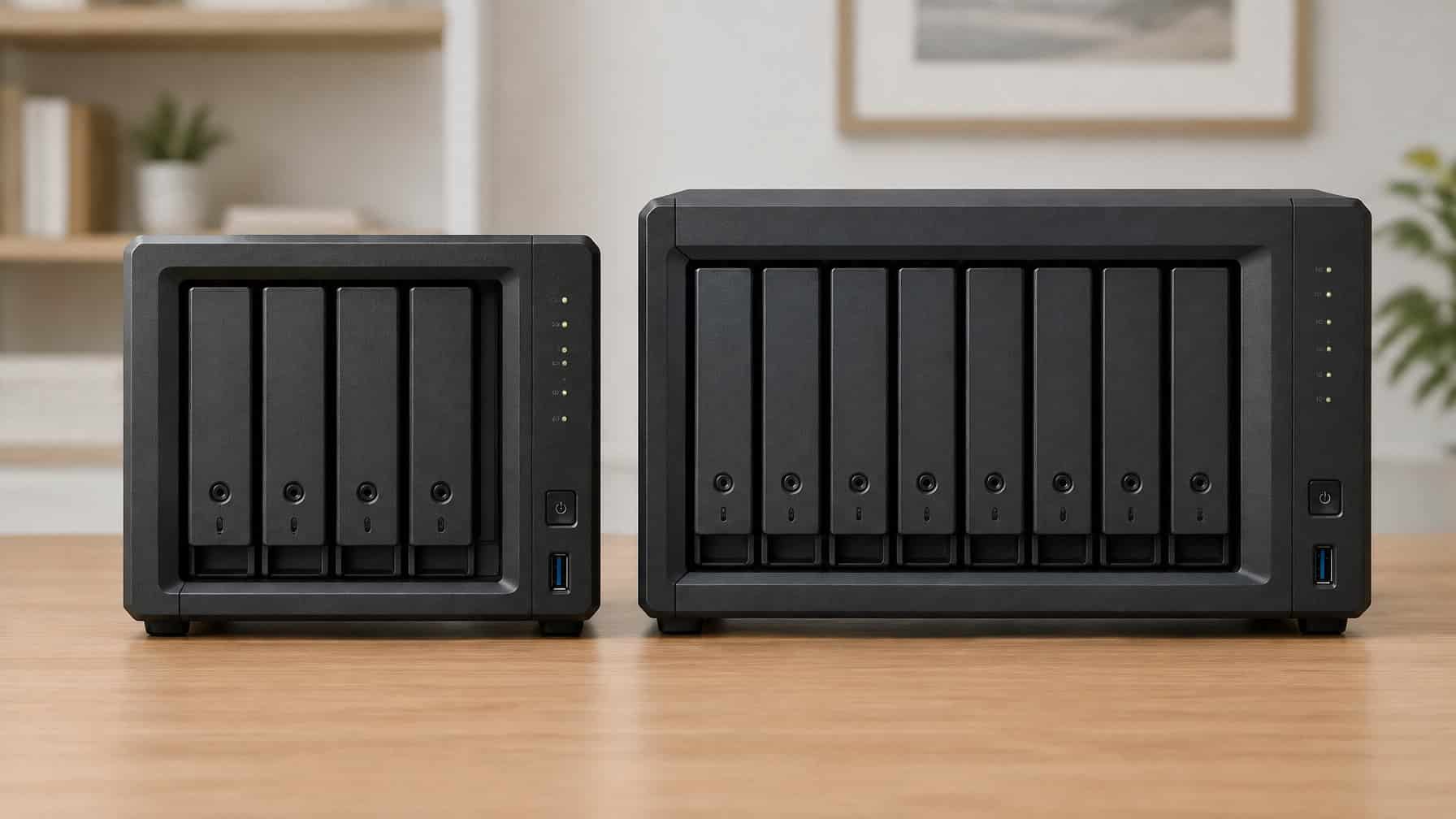
Choosing between a 4-bay and an 8-bay NAS enclosure is one of those decisions that feels small until you run out of space at the worst possible moment. The bay count you pick today defines not just how much storage you have now, but how long your current hardware investment stays useful before you face a full rebuild.
Most people buying their first or second NAS underestimate how quickly archival data, lossless media collections, and open-source software mirrors compound. A 4-bay unit feels generous until RAID overhead, file system formatting, and a hot spare slot quietly eat away at your headline terabyte number.
If you are still deciding whether a NAS is the right fit at all, our guide to what a NAS is and how it works is a good place to start.
This guide walks through every practical dimension of the 4 bay vs 8 bay NAS decision, from RAID math and failure tolerance to real-world network bottlenecks and daily ownership costs. Whether you are outgrowing a 2-bay NAS or planning your first serious data hoarding build, the right bay count depends on specifics that raw capacity numbers alone will never reveal.
4 Bay Vs 8 Bay NAS At A Glance
The core difference between these two form factors comes down to expansion headroom and RAID flexibility. An 8-bay NAS gives you room to grow without drive replacement surgery, while a 4-bay NAS rewards those who want simplicity and a smaller footprint.
Who A 4-Bay Setup Fits Best
A 4-bay NAS devices category hits a practical sweet spot for users who have clear, bounded storage needs. With four drive bays, you unlock RAID 5 and RAID 6 protection that a 2-bay NAS simply cannot offer.
The ideal 4-bay candidate looks like this:
- Family file storage and photo archives under 40 TB usable
- A home lab node that does not need to run heavy concurrent workloads
- Someone who can tolerate one-by-one drive swaps as an upgrade path
- Builds where physical desk or rack space is genuinely constrained
Bay count matters less when your data growth rate is predictable and slow. If your archive grows by 2 to 4 TB per year, a fully populated 4-bay unit with large drives covers years of runway.
Who An 8-Bay Setup Fits Best
An 8-bay NAS makes sense the moment your storage ambitions outpace what four drives can hold under a healthy RAID configuration. With eight bays, you can run RAID 6 without the usable space penalty feeling punishing, keep one or two bays empty for organic growth, and add a dedicated hot spare.
Target users for an 8-bay setup include:
- Data hoarders archiving large datasets, public domain archives, or Linux distribution mirrors
- Home lab operators running containers, VMs, and API synchronization hubs
- Small offices or content creators managing high-resolution media libraries
- Anyone who has already filled a 4-bay NAS at least once
The Fastest Way To Choose Based On Growth
Start with your current data volume and apply a simple forward projection. If you are sitting at 20 to 30 TB of raw data today, and your archive grows by 5 TB or more annually, a 4-bay NAS will be under pressure within three years under RAID 6.
A practical rule: if filling a 4-bay NAS would leave you fewer than one empty bay as a growth buffer, step up to 8 bays. The price difference between enclosures is almost always cheaper than the disruption of an early migration.
Capacity Planning Beyond Raw Terabytes
Raw drive capacity is the number that gets advertised. Usable capacity after RAID overhead, file system formatting, and operational reserves is the number that actually matters for your data. Planning around drive bays rather than just individual drive sizes protects you from the most common NAS sizing mistake.
Why Empty Bays Matter More Than Bigger Drives
An empty bay is not wasted money. It is a future upgrade slot that lets you add storage without touching your existing array.
When you run out of drive bays on a 4-bay NAS, your only growth options are:
- Replacing drives one-by-one with larger models (long, stressful rebuild windows)
- Adding an external expansion shelf (extra cost, extra complexity)
- Migrating your entire array to a new enclosure
With an 8-bay NAS, adding a drive sled and a new disk is genuinely the whole procedure. That operational simplicity compounds over time.
Drive sleds also matter for physical build quality. Better sled designs reduce vibration transfer between drives, which matters more in an 8-bay chassis where drives are in closer proximity.
Usable Space After RAID Overhead
The gap between raw and usable capacity surprises a lot of first-time builders. Using 20 TB drives as a reference point:
| Bay Count | Raw Capacity | RAID 5 Usable | RAID 6 Usable | RAID 10 Usable |
|---|---|---|---|---|
| 4-bay | 80 TB | ~60 TB | ~40 TB | ~40 TB |
| 8-bay | 160 TB | ~140 TB | ~120 TB | ~80 TB |
Real usable space is lower still, after file system overhead, snapshot reserves, and OS partitions. Plan for roughly 10 to 15 percent additional overhead on top of RAID losses.
How Expansion Changes Your Long-Term Cost
A 4-bay NAS with maximum capacity drives forces a full drive replacement cycle to grow. An 8-bay NAS lets you grow incrementally by populating empty bays first, then replacing drives later.
That staged approach smooths costs over time. Buying two drives now and two more in eighteen months is far easier to budget than funding a full eight-drive replacement cycle all at once.
RAID Choices And Failure Tolerance
RAID configuration is where bay count and data redundancy strategy intersect directly. More bays open up more efficient and more fault-tolerant RAID options, and the right RAID level for a 4-bay array is often different from the right choice in an 8-bay system.
RAID 1 In Smaller Arrays
RAID 1 mirrors data across two drives, giving you one complete backup copy at the cost of half your raw capacity. In a 4-bay NAS, you can run two independent RAID 1 pairs, but this sacrifices capacity efficiency and limits RAID 5 or RAID 6 options.
RAID 1 makes sense when:
- You are protecting a small, critical dataset where simplicity matters most
- You want the fastest possible rebuild time after a drive failure
- You need data protection without the complexity of parity RAID
For most data hoarding builds with four or more drives, RAID 1 alone is not the right primary architecture.
RAID 5 Vs RAID 6 For Archive Growth
RAID 5 loses the equivalent of one drive to parity. RAID 6 loses two. That difference feels painful in a 4-bay array, where RAID 6 cuts your usable space to just 50 percent of raw capacity.
In an 8-bay NAS, RAID 6 overhead becomes much more manageable. Losing two drive equivalents across eight bays costs you 25 percent of raw capacity, not 50 percent. For archival data where long-term data integrity matters, RAID 6 is worth that overhead because it survives two simultaneous drive failures, which matters significantly during the extended rebuild windows that large drives now require.
When RAID 10 Makes Sense
RAID 10 combines mirroring and striping, offering strong read performance and fast rebuilds at the cost of 50 percent usable capacity. It requires a minimum of four drives and scales cleanly across 8-bay systems.
RAID 10 suits home labs and API synchronization hubs where read-heavy workloads benefit from striped mirrors. For pure archival data with large sequential writes, RAID 6 on an 8-bay system typically wins on capacity efficiency.
Why RAID Is Not A Backup
RAID protects against drive hardware failure. It does not protect against accidental deletion, ransomware, file corruption that propagates across the array, or controller failure.
Every data hoarding build needs a separate backup strategy alongside RAID. The 3-2-1 rule still applies: three copies, two different media types, one offsite. RAID is data protection at the hardware layer, not a substitute for actual backups.
Performance Limits In Real-World Use
Bay count alone does not determine performance. Network interface speed, SSD caching configuration, and the NAS hardware platform underneath all combine to define what your array can actually deliver in daily use. Understanding where the bottlenecks appear helps you avoid paying for storage capacity that your network can never fully saturate.
When 1 GbE Becomes The Bottleneck
A standard 1 GbE connection has a theoretical ceiling of around 125 MB/s. In practice, real-world NAS transfers land between 80 and 112 MB/s depending on file sizes and CPU overhead.
That ceiling matters when you are pushing large archival data transfers across your local network. A fully populated 8-bay NAS with fast HDDs in RAID 5 can easily saturate 1 GbE during sequential writes. The drives are not the bottleneck; the network is.
For light home backup use and small file transfers, 1 GbE remains adequate. For anything heavier, it becomes a ceiling you will notice immediately.
What 2.5GbE Changes For Multi-User Access
2.5 GbE delivers roughly 300 MB/s theoretical throughput. In practice, that means sustained sequential transfers of 200 to 250 MB/s on a well-configured NAS with adequate CPU resources.
For multi-user environments where several family members or home lab services access the NAS concurrently, 2.5 GbE meaningfully reduces wait times. Most modern 4-bay and 8-bay NAS units now include at least one 2.5 GbE port as standard, making this the practical minimum for new builds in 2026.
When 10GbE Is Worth Paying For
10 GbE infrastructure raises costs significantly, covering both the NAS hardware and the switch or direct-attach connection at the client end. For most home users, the drives in a spinning-disk NAS cannot saturate even 2.5 GbE during typical workloads.
10 GbE becomes worthwhile when you are running an SSD-tiered array, moving multi-hundred-gigabyte datasets regularly, or hosting containers and API synchronization hubs that demand low-latency, high-throughput storage access.
How SSD Caching And M.2 NVMe Affect Responsiveness
SSD caching accelerates small, random I/O operations by storing frequently accessed data on fast flash storage. M.2 NVMe slots on higher-end NAS devices let you dedicate SSD cache without consuming a spinning-disk bay.
For data hoarding builds that primarily do large sequential writes, SSD cache adds little benefit. For home labs running databases, containers, or application data alongside archival storage, an M.2 NVMe SSD cache dramatically improves system responsiveness without touching your raw drive capacity.
Hardware Features That Affect Daily Ownership
The right NAS enclosure on paper can still be frustrating to live with daily if the hardware design creates noise problems, hot-swap friction, or locks you into a limited ecosystem. Evaluating these practical ownership factors before buying saves significant headaches across a multi-year ownership cycle.
CPU, RAM, And Expansion Headroom
The processor and RAM inside a NAS define what workloads it can handle beyond simple file storage. An underpowered CPU struggles with transcoding, container scheduling, and encryption overhead simultaneously.
Key considerations:
- Entry 4-bay models often use ARM-based processors with 2 to 4 GB of RAM, adequate for backups but limited for running active workloads
- Higher-end 4-bay and most 8-bay units use x86 processors with expandable RAM, enabling Docker containers, virtual machines, and real API synchronization hubs
- Check whether RAM is soldered or user-expandable before committing to a platform
Noise, Cooling, And Fan Noise Expectations
Fan noise in NAS devices scales with both drive count and chassis design. An 8-bay unit moving heat from eight spinning drives will be louder than a 4-bay unit under similar load conditions.
Drive spin-up noise and seek noise from HDDs also compound across more drives. Placing an 8-bay NAS in a home office versus a dedicated equipment closet is a meaningful quality-of-life decision that deserves consideration before purchase.
Hot-Swap Convenience And Drive Sled Design
Hot-swap bays let you replace a failed drive without powering down the system. Most 4-bay and 8-bay NAS units include tool-free hot-swap drive sleds at the mid-range and above.
Drive sled quality varies significantly between brands. Cheaper sleds that flex under drive weight accelerate vibration wear over time. If you are comparing QNAP against the TR-004 expansion unit form factor, handling the sleds physically before committing to a platform is worth the effort when possible.
Brand Ecosystems And Add-Ons
Synology and QNAP dominate the consumer and prosumer NAS market. Both offer app ecosystems, but they lock you into specific hardware compatibility lists for RAM, drives, and expansion units.
QNAP offers broader hardware flexibility and more aggressive networking options out of the box, including Thunderbolt connectivity on select models. Synology prioritizes software maturity and a more polished user experience. The right choice depends on whether your priority is hardware customization or software reliability.
Best Fit By Use Case And Buying Budget
Matching your NAS bay count to your actual use case prevents both overspending on hardware you do not need and undersizing in ways that force an early, expensive upgrade. The comparison between a 4-bay and an 8-bay NAS becomes clearer when mapped to specific real-world scenarios.
Private Backup And Family File Storage
A 4-bay NAS running RAID 5 or RAID 6 is genuinely sufficient for household backup and family digital asset storage. Four bays with 8 TB drives in RAID 5 delivers around 21 TB of usable space after real-world overhead, which covers most family photo archives, document collections, and personal digital preservation projects for several years.
Drives like the Seagate IronWolf series are purpose-built for always-on NAS use, with vibration compensation that matters in multi-drive enclosures. A 4-bay setup with IronWolf drives and a 2.5 GbE connection is a complete, durable solution for this use case without the added cost of an 8-bay chassis.
Large Archival Data And Data Hoarding Builds
For serious data hoarding builds targeting public domain archives, large datasets, or open-source software preservation, an 8-bay NAS is the starting point worth considering rather than the upgrade destination.
At datahoarder.io, the approach to archival builds consistently emphasizes buying ahead of your immediate need. An 8-bay unit with four drives populated today and four empty bays for growth is a more efficient long-term investment than a fully packed 4-bay unit that forces a painful migration within two years.
Maximum capacity on an 8-bay build using current high-density drives reaches well over 100 TB usable under RAID 6, providing the kind of multi-year runway that archival data collections demand.
Home Labs, Containers, And API Synchronization Hubs
Home lab operators running containers, virtual machines, and API synchronization hubs need both storage capacity and processing headroom. An 8-bay NAS with an x86 processor, expandable RAM, and M.2 NVMe slots for SSD caching handles these workloads far better than a budget 4-bay unit.
The additional drive bays also support storage separation: dedicating specific bays to application data, virtual machine disk images, and bulk archival storage independently, without the I/O contention of mixing workloads on a minimal 4-bay array.
A Simple Decision Framework Before You Buy
Use this checklist before committing to either bay count:
- Current data volume above 30 TB raw: Start with an 8-bay unit
- Annual growth rate above 5 TB: An 8-bay unit protects your investment longer
- Need RAID 6 with acceptable usable space: Requires 6 or more bays; an 8-bay is ideal
- Budget-limited with modest, predictable storage needs: A 4-bay unit with room to grow is reasonable
- Running active workloads alongside archival storage: An 8-bay unit with a stronger CPU platform is worth the premium
For premium Usenet access to complement your NAS archiving workflow, Get Newshosting or Get Easynews offer the retention and download speeds that match serious data preservation builds.
More DIY NAS guides
- DIY NAS build guide (start here)
- What is SnapRAID?
- SnapRAID + MergerFS build
- SnapRAID vs Unraid
- ZFS vs BTRFS
- Best NAS cases
- Shucking hard drives
- IronWolf vs WD Red