

What is unlimited cloud storage? Unlimited cloud storage is a remote backup service that allows you to store an infinite amount of data for a flat monthly or yearly fee. Unlike traditional cloud drives (like Google Drive or Dropbox) that charge by the terabyte, unlimited storage plans do not cap your file sizes or total data limits.
If you are a serious data hoarder, you already know the golden rule of digital preservation: the 3-2-1 backup strategy. You need three copies of your data, on two different media types, with one copy stored off-site.
While building a home NAS covers your local storage, you still need an off-site backup. If a fire, flood, or robbery destroys your physical hard drives, your data is gone forever.
The problem? Most cloud providers charge a fortune once you pass 2 Terabytes of data. If you have a 20TB collection, Google Drive will cost you hundreds of dollars a month.
In this guide, we will break down the best unlimited cloud storage options designed specifically for people with massive amounts of data.
| Provider | Best For | Storage Limit | Best Feature |
|---|---|---|---|
| Backblaze Personal Backup | Best Overall | Truly Unlimited | Backs up external USB hard drives at no extra cost. |
| CrashPlan for Small Business | Best for Advanced Users | Truly Unlimited | Infinite file versioning and deleted file retention. |
| OpenDrive | Best Unlimited “Sync” Drive | Truly Unlimited | Acts as a virtual hard drive for easy file sharing. |
Why “Sync” Drives Don’t Work for Data Hoarders
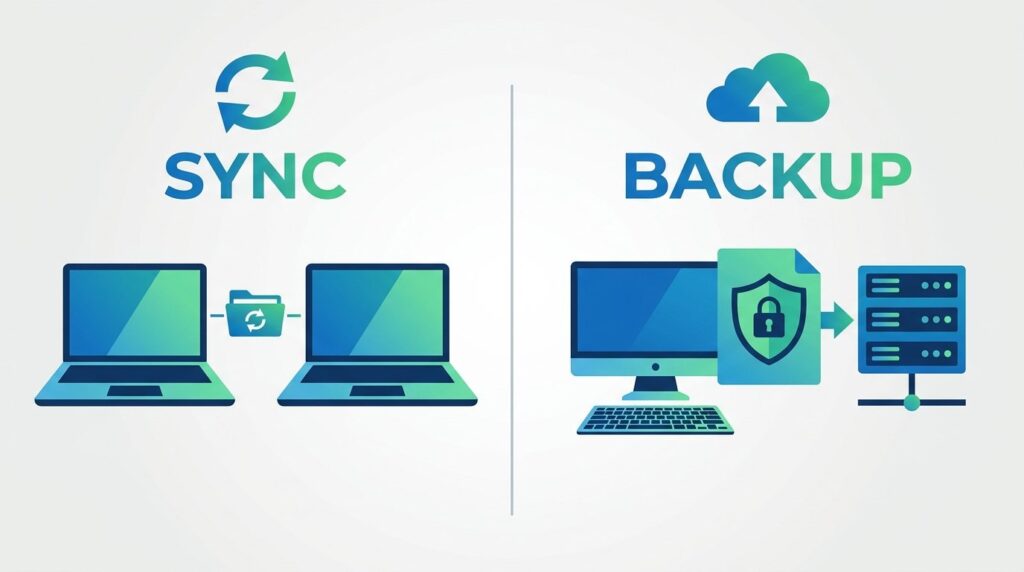
Before we look at the providers, you need to understand the difference between a “Cloud Sync” drive and a “Cloud Backup” service.
- Cloud Sync (Google Drive, Dropbox, OneDrive): These services create a folder on your computer. Anything you drop into that folder is synced to the cloud and across all your devices. They are incredibly expensive for large amounts of data and rarely offer true “unlimited” plans for individuals.
- Cloud Backup (Backblaze, CrashPlan): These services run silently in the background of your computer. They take a perfect copy of your entire hard drive (and any attached external USB drives) and back it up to the cloud. They do not “sync” across devices, but they offer true unlimited storage for a flat fee.
For data hoarders, Cloud Backup is the only affordable way to protect massive archives.
The Best Unlimited Cloud Storage Providers
1. Backblaze Personal Backup (Best Overall)
Backblaze is the undisputed champion of unlimited cloud storage. For a single flat yearly fee, Backblaze will back up every single file on your computer, no matter how large.
Best of all, it supports external hard drives. If you built a Raspberry Pi NAS using massive external USB drives, Backblaze will back up those drives to the cloud without charging you an extra penny. There are no file size limits, no speed throttles, and no hidden fees.
- Storage Limit: Truly Unlimited
- Best Feature: Backs up external USB hard drives at no extra cost.
2. CrashPlan for Small Business (Best for Advanced Users)
CrashPlan used to offer a personal plan, but they have since pivoted to a “Small Business” model. However, any individual can sign up for it.
Like Backblaze, CrashPlan offers truly unlimited storage for a flat monthly fee. Where CrashPlan shines is its advanced retention policies. If you accidentally delete a file on your local computer, CrashPlan can keep the deleted cloud copy forever (whereas Backblaze deletes it after 30 days unless you pay for extended version history).
- Storage Limit: Truly Unlimited
- Best Feature: Infinite file versioning and deleted file retention.
3. OpenDrive (Best Unlimited “Sync” Drive)
If you absolutely must have a “Sync” drive (where you can easily share content with other people via web links) rather than a pure backup service, OpenDrive is one of the very few companies left offering an unlimited personal plan.
While it is more expensive than Backblaze, it functions just like Dropbox. You get a virtual drive on your computer with infinite space. However, data hoarders should be aware that upload speeds can sometimes be slower than dedicated backup providers.
- Storage Limit: Truly Unlimited
- Best Feature: Acts as a virtual hard drive for easy file sharing.
How to Secure Your Cloud Backups

When you upload your entire digital life to a corporate server, privacy is a major concern.
Fortunately, the best unlimited cloud storage providers offer Private Encryption Keys (Zero-Knowledge Encryption). This means that before your files ever leave your computer, they are encrypted using a password that only you know.
Even if a hacker breaches the cloud server, or if the company’s employees try to look at your files, they will see nothing but scrambled code. They cannot unlock your files without your private key.
If you use premium Usenet providers, setting a private encryption key ensures your cloud backup remains completely anonymous and secure.